UK / International Returns
How to Make a Return
Using the form provided inside your original parcel:
-
Please note down which item(s) you would like to return in the blank
section and include the return reason code.
Include the return form inside your parcel. - To print your return label, please visit: https://petermillar.returns.dhlexpresscommerce.com/
-
Please enter the Order Number (e.g. PMUK-01012345), followed by the email
address that you placed your order with.
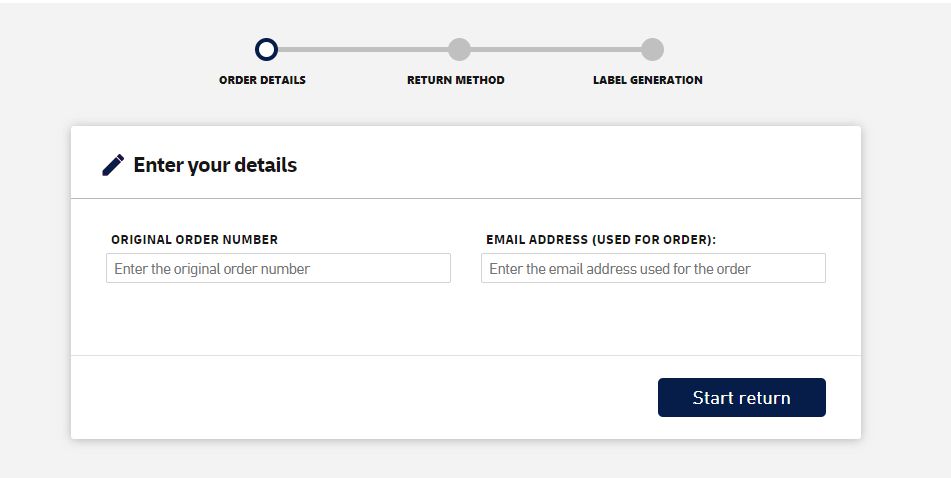
-
Click Start Return
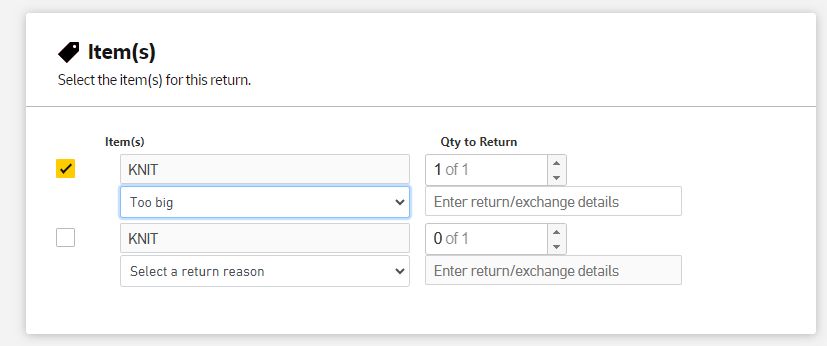
- Tick the box next to the item you would like to return,
- Select the quantity you will be returning,
- Select from the drop-down menu the reason for returning the goods.
To finalise your return, please select the return method:
-
Courier Pickup:
- (if selecting this option choose the time you'd like your return to be collected)
- Click generate label, print the return label, and attach to the packaged item, ready for pickup by the courier.
-
Drop-off at available service point:
- Print the return label, attach to the packaged item, and drop off to a DHL Express Service Point
- Click Find a Service Point location to drop off too.
As a reminder, please complete and include the return form inside your return parcel.
If you’ve lost your return form and wish to make a return, please download and print a return form.
Returns Address
Peter Millar UK – Web Returns
  Falcon House
  7 Delaware Drive
  Tongwell
  Milton Keynes
  MK15 8HG